Developers often think about resources in terms of CPU, Memory and Storage, and occasionally network bandwidth. I have been interested for a while in memory bandwidth - which is the throughput at which data in RAM can be read by the processor. This aspect of compute capacity isn’t often talked about except in the most extreme scaling contexts, on some very niche hardware and capacity adjacent groups.
I’ve been thinking about it more recently as I’m building a home server to use for LLM inference, and as it turns out, memory bandwidth is one of the dominant bottlenecks for this specific task.
I will be testing this aspect of LLM inference in much more detail in the future, but for now this post is high level about memory bandwidth.
Memory Latency vs Bandwidth
In addition to total memory size and bandwidth, memory can also be differentiated by its latency, which is the time it would take to do a single read. This is usually ~nanoseconds.
Some workloads might not really be affected by memory bandwidth at all, especially if they don’t read large amounts of data. They might read comparatively less data from memory and spend more time doing actual computations. Especially for workloads that do a lot of small random access, they might be affected more by memory latency and may not actually benefit from any differences in bandwidth. Most games and databases would probably fall under this category.
Applications that would actually care about memory bandwidth usually need to sequentially read a large volume of data from memory. This would probably include things like image and video processing, LLM inference, and analytics/data processing
MT/s vs MHz
MT/s (megatransfers per second) measures actual data transfers per second and is the correct unit for bandwidth calculations. MHz measures clock cycles. These are not the same. DDR (Double Data Rate) memory performs two transfers per clock cycle, so a 1600 MHz DDR4 clock produces 3200 MT/s. DDR4/DDR5 specs like “DDR4-3200” already include this doubling in the name.
Many online sources conflate the two units and may refer to specs such as “DDR4-3200MHz” when they actually meant 3200MT/s, with the frequency being 1600MHz.
Theoretical formula:
We can predict how much memory bandwidth is potentially available if we know some basic details about the hardware:
Bus Width * Transfer per second * numChannels = BandwidthSome Example Configurations
Here are some examples of common hardware configurations and what kind of memory bandwidth they may be capable of. I included a GPU in the list to put it in context and humble the CPU numbers a bit, which look big to the uninitiated.
| System | Memory Type | Bus Width | Speed (MT/s) | Channels | Theoretical Bandwidth |
|---|---|---|---|---|---|
| Raspberry Pi 5 | LPDDR4X | 16 bits | 4267 | 2 | 17.1 GB/s |
| Older (~2020) Laptop | DDR4 | 64 bits | 3200 | 2 | 51.2 GB/s |
| Newer (~2026) Gaming Desktop | DDR5 | 64 bits | 5200 | 2 | 83.2 GB/s |
| M4 Pro MacBook Pro | LPDDR5X | 16 bits | 8533 | 16 | 273 GB/s |
| EPYC (Rome/7XX2) Server | DDR4 | 64 bits | 2400 | 8 | 153.6 GB/s |
| NVIDIA RTX 5090 GPU | GDDR7 | 32 bits | 28000** | 16 | 1,792 GB/s |

** GDDR7 (Graphics Double Data Rate) is advertised as 7Ghz, but thanks to Double Data Rate (2X) and clever signal encoding (PAM4, another 2X), it achieves 28,000MT/s with that 7Ghz, which would be the equivalent of desktop DDR4 or DDR5 running at 14,000Mhz.
STREAM Benchmark
I quickly found that the industry standard memory bandwidth benchmark
is STREAM. It is a
single .c file which allocates a 3 large double[]’s and
does some very simple loops:
- Copy:
c[i] = a[i] - Scale:
b[i] = scalar * c[i] - Add:
c[i] = a[i] + b[i] - Triad:
a[i] = b[i] + scalar * c[i]
Out of these 4, TRIAD is usually used as the standard measurement when reporting and comparing results because it is the most realistic workload, and because it is the hardest for compilers and memory controllers to “cheat” on.
For some reason, I thought this kind of test would be a lot more complicated, but the code examples in my list are almost exactly the c code from the benchmark.
Running it on everything
I wanted to test this on various devices that I own to get a better intuition of how memory bandwidth works in practice. I compiled STREAM with the same settings on each one and used these settings for all of the tests.
gcc -O3 -march=native -mcmodel=medium -fopenmp -DSTREAM_ARRAY_SIZE=50000000 -DNTIMES=50 stream.c -o streamThis compiles STREAM to use ~400MB arrays for a,b and c (~1.2GB total) and test each operation 50 times. It reports the best result for each test.
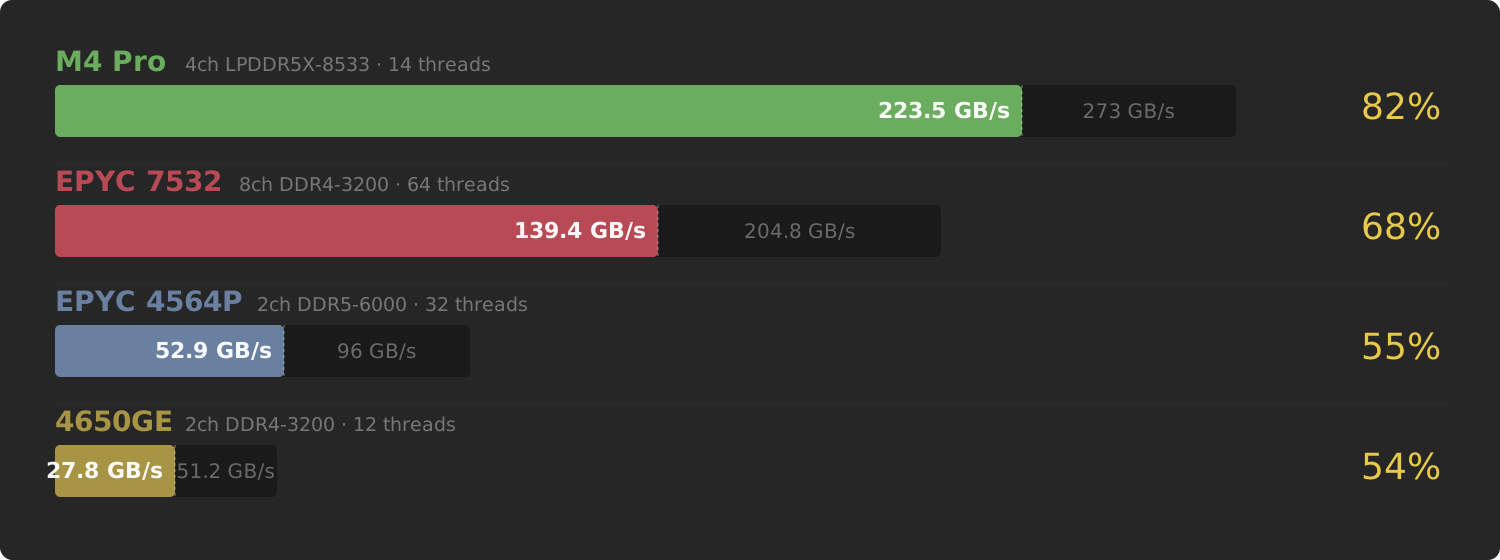
These are the computers that I ran it on and their initial results. They were all farther than I expected from their theorized bandwidth numbers, falling in the 50-80% range.
How Many Threads to Saturate Bandwidth?
By default, STREAM will run nproc threads. On most
modern CPUs, this is 2x the number of physical cores because of
SMT/hyperthreading. I also know from experience that many resource
intensive tasks don’t run optimally when there are too many active
threads, so I decided to do a thread sweep test from 1 to
nproc.
for i in $(seq 1 $(nproc)); do
    OMP_NUM_THREADS=$i OMP_PROC_BIND=spread OMP_PLACES=cores ./stream
done;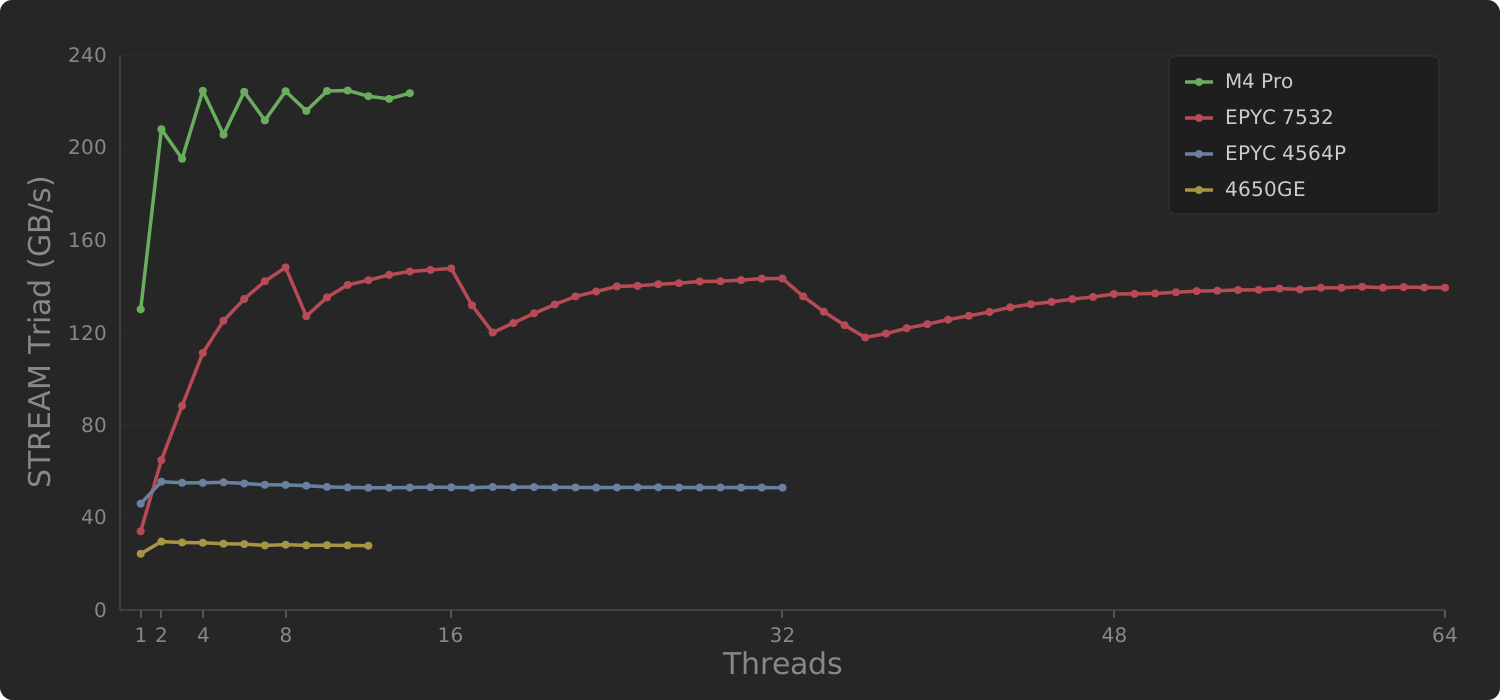
It only takes a small number of threads to completely saturate the memory bandwidth of each system. In fact, every single one peaked their bandwidth utilization with only about 1/4th of their total available cores: 3-4 threads on all machines except for the Epyc 7532 which peaked at 8. Memory bandwidth is easier to exhaust than I thought.
If we consider the case of a cloud VM provider, for example, this means that even one small tenant with 4-8 cores allocated out of 64 or 128 total could potentially cause memory bandwidth contention for the whole machine, even if they are kept within all of their other resource limits.
Epyc 7532’s Sawtooth Pattern
One interesting pattern for the Epyc 7532 is that there are certain numbers of threads which have peaks, rather than a steady dropoff or levelling as threads increase. Those peaks are at multiples of 8: 8, 16, 32, with sharp drop off after adding 1 more thread (9, 17, 33), which strongly suggests that Epyc’s memory controller seems to perform much better when work is distributed evenly across CCDs (the CPU has 8 physical sets of cores called Core Complex Dies). I will have to research further to understand that mechanism, but for now it’s useful to know that there can be specific optimal thread configurations.
Varying Frequency
Two of my computers also have BIOS options to vary the transfer rates (frequency) of the installed memory, so I thought that was worth testing as well. Memory that’s rated for a higher frequency often costs a lot more, so it may be useful at purchase time to know how much of a difference this actually makes to usable bandwidth. According to the calculations at the beginning of this post, there’s a direct proportional relationship, but as we’ve seen in some of the tests, there are a lot of other factors that make the real bandwidth number different than the theoretical one.
This test was a lot more work since I actually had to reboot the machine and change BIOS Settings between each test. And in the case of running the EPYC 7532 server at 2133MT/s, I actually had to replace the 8 DIMMS with 2133-rated DIMMs specifically for that test, since the BIOS did not allow me the option to run my usual 3200 DIMMS lower than 2666MT/s.
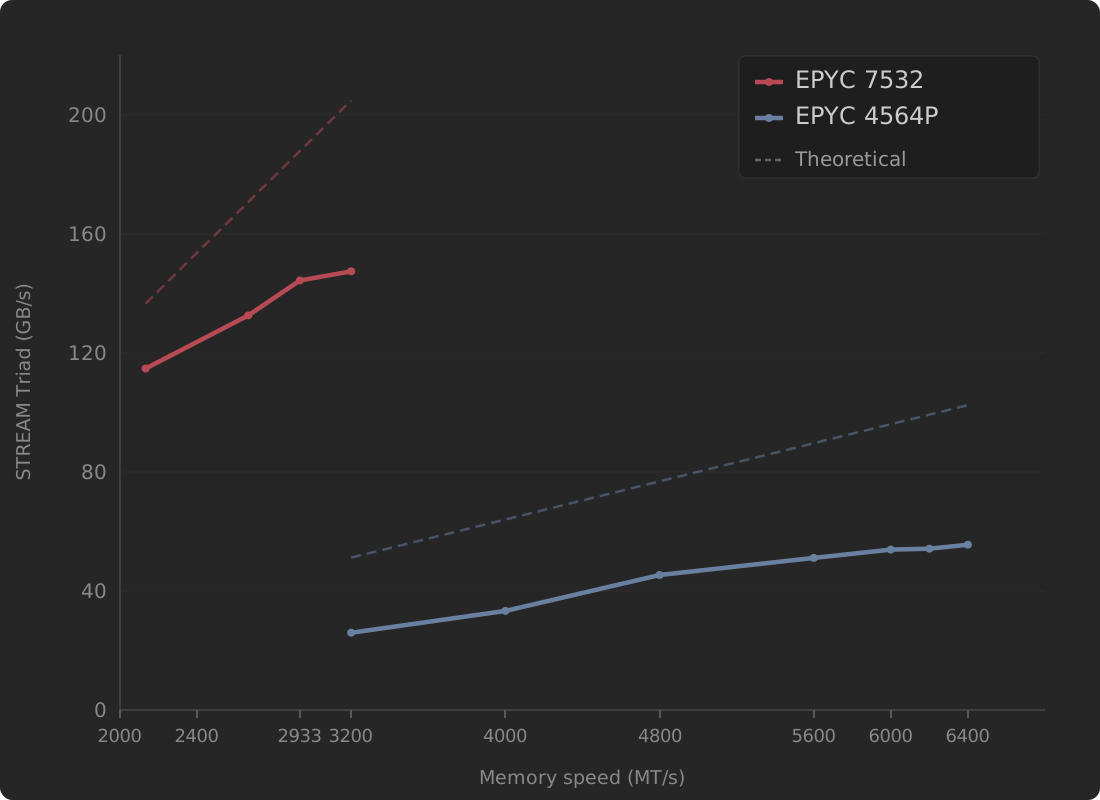
Here we can see that increasing memory frequency actually does increase the usable bandwidth. However, it doesn’t keep up with the theoretical number. This is useful to know as upgrading from 2133 to 2933 might be worth the cost, but upgrading from 2933 to 3200 might not be worth the extra expense unless you really need to squeeze out that last couple of percent of available bandwidth.
Making Sure Not to Benchmark Cache
In my initial tests, I compiled STREAM with an array size 50 million elements. I did not pick that randomly, I needed a data size large enough so that it would actually have to reside in memory and not just fit within the L3 cache of a CPU. My Epyc 7532 has a whopping 256MB of total L3 Cache, so 1.2GB of data should be enough to not accidentally measure L3 cache bandwidth instead of main memory bandwidth (3 arrays * 50M elements * 8 bytes per double = 1.2GB). Just to confirm, I ran a cache sweep test where I test a range of 23 total sizes from 384 KB (16383 elements) up to ~3GB (122M elements), incrementing by 1.5X between tests.
Pseudocode for this test was approximately:
threads = $(( $(nproc) / 2 )) # Used nproc/2 for all systems
elements = 16384
for i in $(seq 0 22); do
    # recompile STREAM with new array size
    gcc -DSTREAM_ARRAY_SIZE=${elements} -DNTIMES=${ntimes} "$STREAM_SRC" -o stream
    # Run the test
    OMP_NUM_THREADS=$threads OMP_PROC_BIND=spread OMP_PLACES=cores ./stream
    elements *= 1.5
done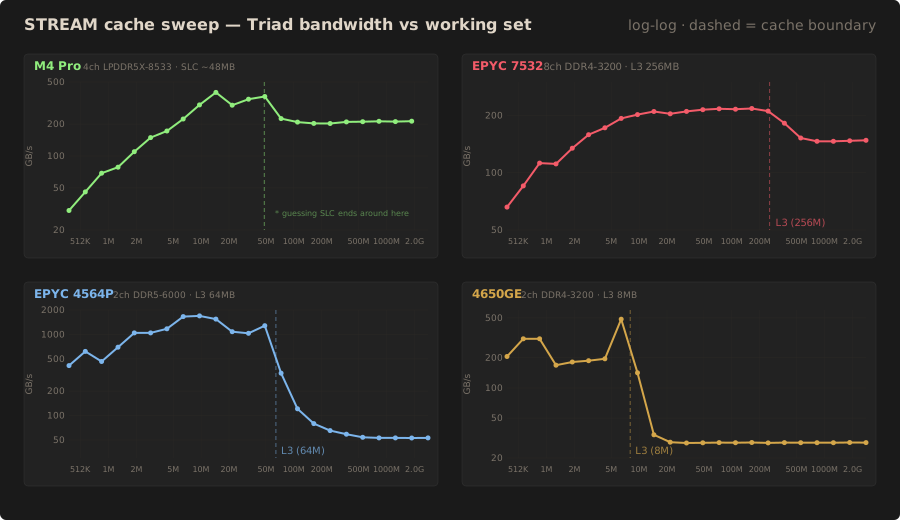
In the charts I overlayed a vertical line at each CPU’s L3 cache. It pretty clear that using arrays smaller than this seriously throws off the results, possibly for 2 reasons:
- Cache is much faster than main memory anyways
- Because of 1, some of the tests finish so fast that the timer resolution makes bandwidth calculations noisy
Measurements quickly stabilizes after the data has increased past the L3 cache size for a given CPU.
Note on Apple M4’s Cache
For the M4 pro, Apple doesn’t publish a cache size details but based on these results and a quick eyeballing of a memory latency test, I would assume its something in the range of 24-48MB, which also lines up with the STREAM test. The sharp dropoff appears around 72MB, which may correspond to Apple’s “SLC” (System Level Cache) which also serves the integrated GPU and neural engine.