Nvidia doesn’t support NVLink on consumer GPUs anymore. The last one that had it available was the RTX 3090.
Right now in April 2026, NVLink bridges are pretty expensive, $200-$400 depending on the exact size and whether you’re able to snipe one at retail. Since I have two 3090s, I wanted to test how much benefit NVLink actually provides for AI workloads.
The Tests
I ran a few tests to measure the effect that adding NVLink would have on AI-related workloads:
- Model Inference with layer split and tensor parallelism. I used llama-bench with Llama 3.3 70B and Gemma 4 31B. Layer split does very little inter-GPU communication, while tensor parallel inference must sync at every layer.
- Model Training using DDP for TinyLlama 1.1B and FSDP for Qwen2.5 3B. DDP only syncs once to compute gradients at each step, while FSDP requires constant data transfers.
With these, I felt I had a good mix of tests that would be affected to different degrees by inter-GPU bandwidth.
Hardware
| CPU | AMD Epyc 7532 (32 Cores, 128 PCIe lanes) |
| Motherboard | Supermicro H12SSL-i, 5 PCIe 4.0 x16 Slots |
| RAM | 8 Channels, 32GB DDR4-3200, 256GB total |
| GPU | 2x EVGA RTX 3090, installed directly in slots 3 & 6, both running at full x16 bandwidth. |
| OS | Ubuntu 24.04, Nvidia driver 595 |
Initial Results
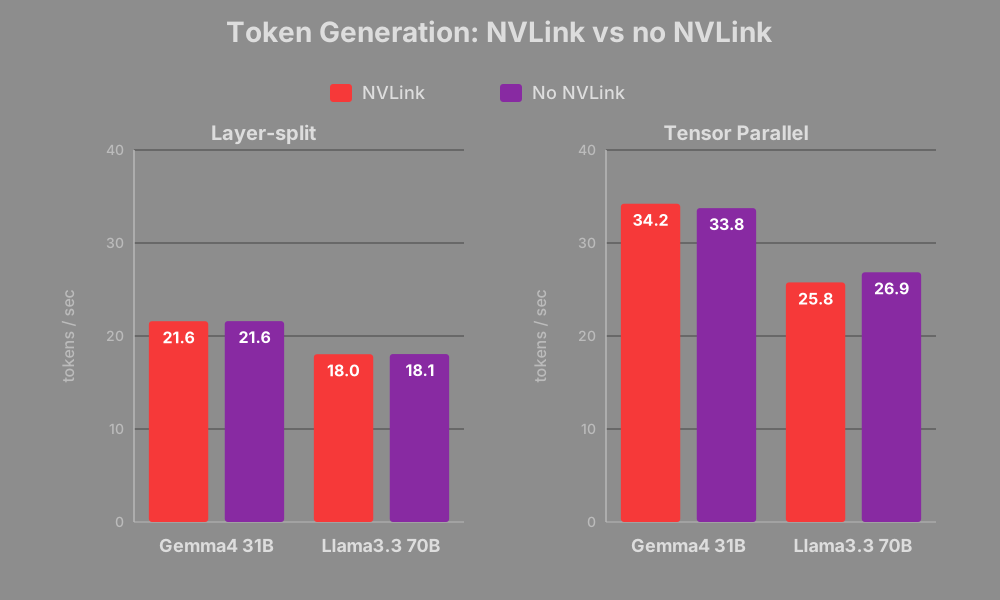
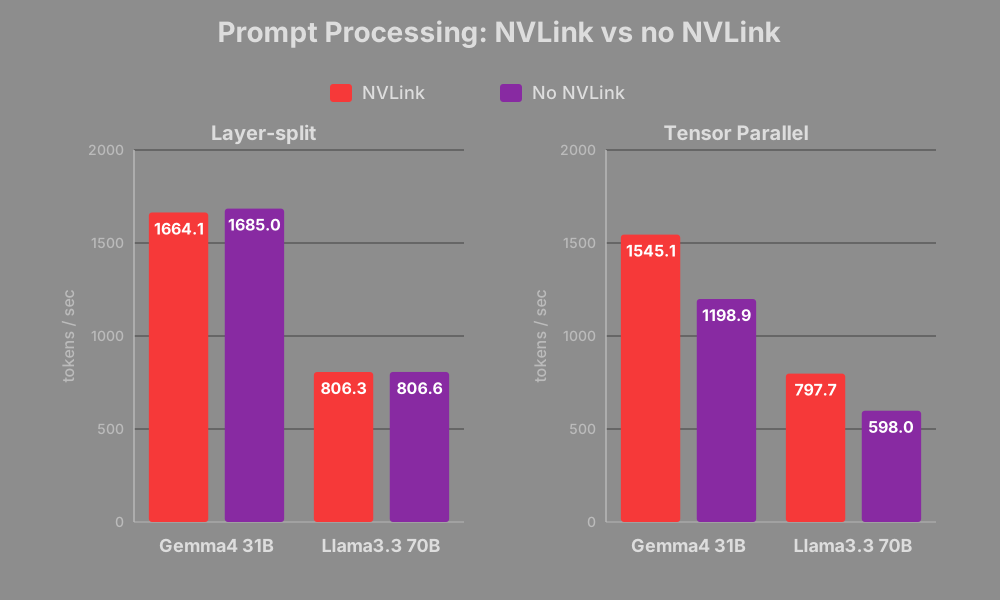
The performance on all layer split tests was unaffected. For model inference with tensor parallelism, NVLink boosted prompt processing by about 30%, while token generation speed was exactly the same.
Token generation speed being the same on tensor parallel runs was unexpected. I thought there would be a large difference since it needs to sync activations frequently. Although token generation speed is usually the headline number, I still care a lot about prompt processing speed since most of my usage patterns, such as coding agents, use very long context windows.
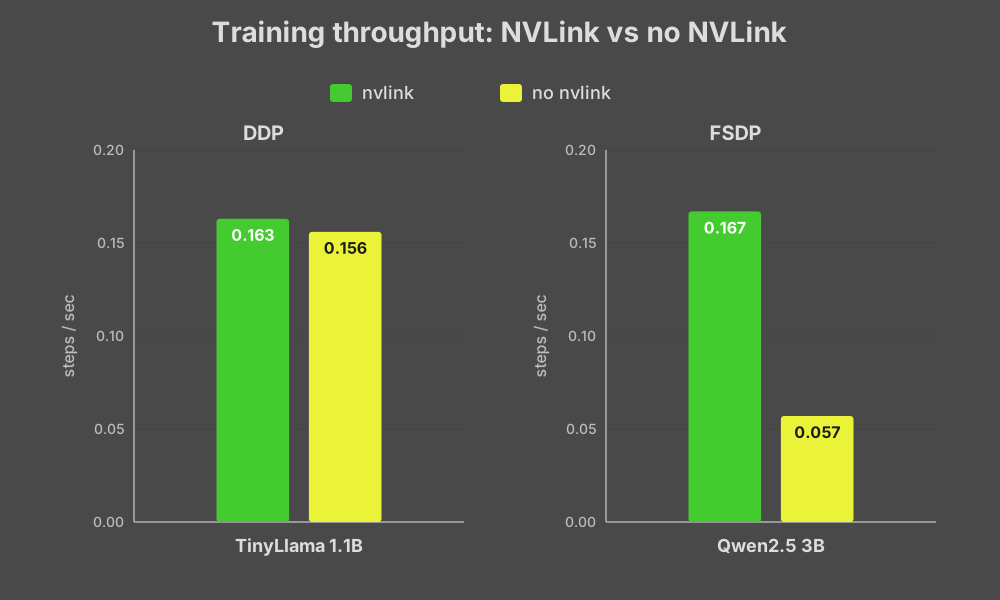
The uplift for FSDP training is huge, a nearly 3x improvement. DDP training was not affected at all.
However, I consider this data to be somewhat misleading, as the non-NVLink tests were not actually measuring GPU data transfer over PCIe like I initially thought.
In all of my subsequent test configurations, inference with layer split, tensor parallel token generation, and DDP training were completely unaffected (within 3%/noise). I will omit any more charts/data for those tests and show only tensor parallel prompt processing and FSDP training. All data available here.
Pitfalls With Disabling NVLink For Tests
In my first test, I used NCCL_P2P_DISABLE=1 for my
non-NVLink test. I had also set NCCL_DEBUG=INFO so I could
verify that the GPUs were using the channel I expected. I noticed lines
at test startup like this:
gpu:11419:11419 [0] NCCL INFO Channel 03 : 0[0] -> 1[1] via SHM/direct/directThis means that instead of using P2P (Peer-to-Peer over PCIe), the GPUs were falling back to SHM (Shared Host Memory), which is a full round trip to main memory and incurs a higher performance penalty.
It’s not actually possible to specifically disable NVLink while it’s
installed and force the GPUs to use P2P. NCCL_P2P_DISABLE=1
disables P2P over PCIe as well and transfers go over SHM.
I reran the tests by physically unplugging the NVLink bridge.
SHM vs P2P, Nvidia’s Restrictions
Even after unplugging the NVLink bridge, NCCL was still logging that it was using SHM. Nvidia disables P2P entirely on consumer GPUs, presumably for product segmentation. This is an artificial restriction by Nvidia at the driver level; the RTX 3090 and other consumer GPUs are capable of doing it. Some clever people have figured out how to bypass this restriction by patching the drivers, and the solution is pretty easy to install: open-gpu-kernel-modules.
I installed the patch and tested it again. I confirmed the NCCL log messages indicating that it was using P2P this time:
gpu:11090:11152 [1] NCCL INFO Channel 00/0 : 1[1] -> 0[0] via P2P/direct pointerResults Using Actual P2P Communication
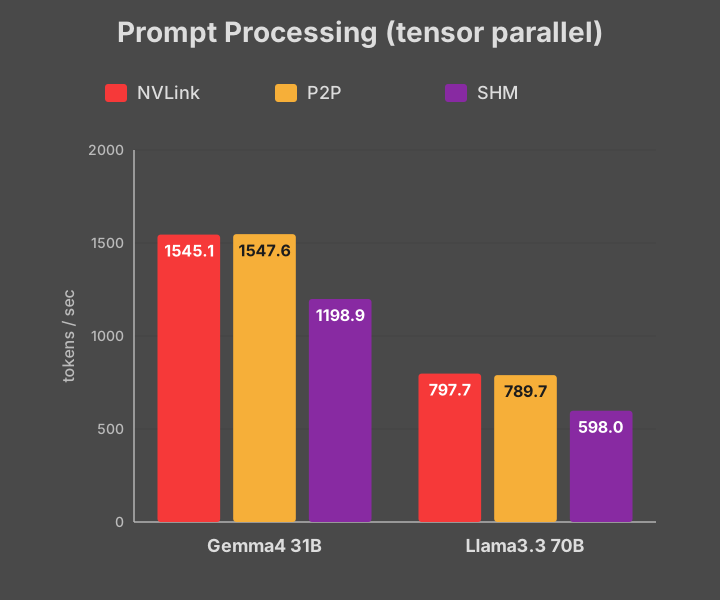
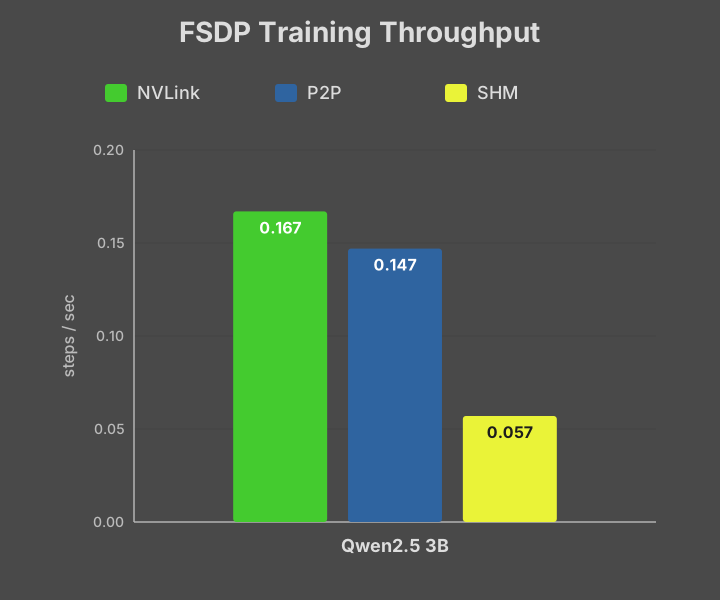
Enabling P2P almost entirely makes up the difference between SHM and NVLink. Prompt processing speeds are basically identical and FSDP training reaches over 90% of the performance of NVLink.
So why would anyone drop $300 on an NVLink bridge?
Consumer Platforms
NVLink doesn’t really have much of a benefit for my specific setup. I already have a server CPU & motherboard (Epyc 7532 + Supermicro H12SSL-i), which comes with multiple full PCIe Gen4 x16 slots. I can install multiple GPUs and each of them gets full x16 bandwidth. However, the average consumer is probably not using a server platform at home.
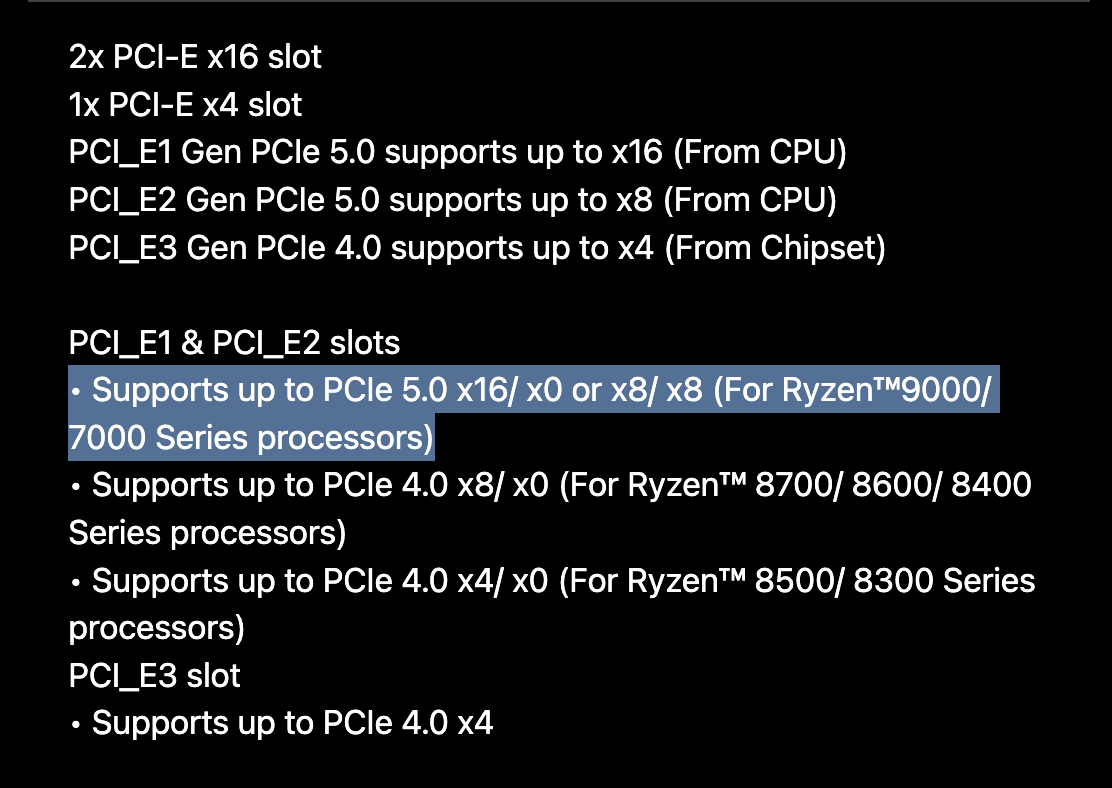
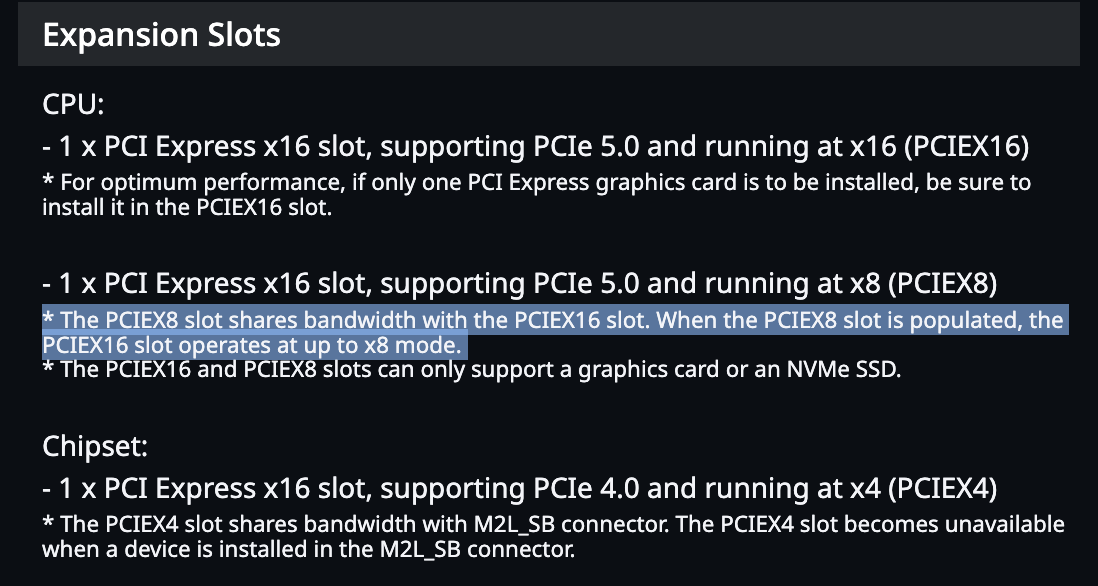
Consumer CPUs don’t have support for a lot of PCIe lanes. As a result, the motherboards for these CPUs don’t have many x16 slots. Some motherboards advertise 2 x16 slots, but what they actually mean is that they have two x16 sized slots, but only one of them has full x16 bandwidth. Furthermore, there’s a caveat that if you install a card into the second x16 sized slot, it will actually bifurcate the bandwidth from the main x16 slot and they will both run at x8/x8.
The two most expensive consumer motherboards I could find state in their specs that they, in fact, only have 1 full x16-bandwidth slot and that using the second one will result in an x8/x8 configuration.
| MSI MEG X870E GODLIKE X EDITION | Gigabyte Z890 AORUS XTREME AI TOP |
 |
 |
| $1300 | $1000 ($1500-1800 retail) |
These products are hilariously named/marketed (EXTREME AI and GODLIKE EDITION), but alas, consumer CPU limitations mean they cannot take full advantage of multiple GPUs, which is often the main way to upgrade an AI workflow. They have the exact same PCIe capabilities as much cheaper motherboards. For example the Asus ProArt B650 Creator retails for ~$230 and also supports x16 and x8/x8 modes on its 2 PCIe x16 slots.
In all of these cases, an NVLink bridge completely bypasses PCIe slot limitations and allows the GPUs to communicate at their maximum bandwidth.
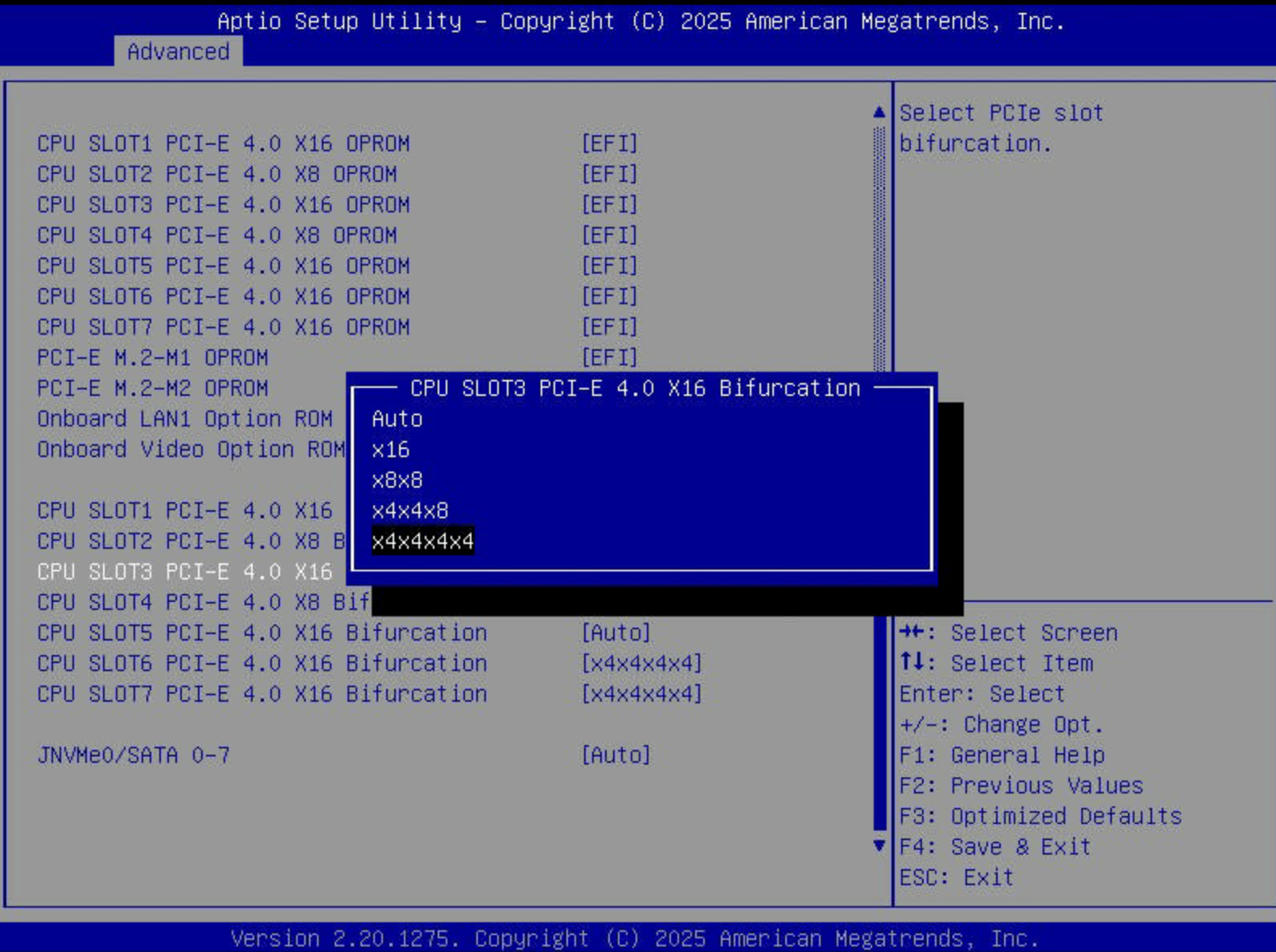
I went into my BIOS and throttled my PCIe slots to x4 and again to x8 to simulate what would happen in a more common consumer setup.
Performance with PCIe x8 and x4
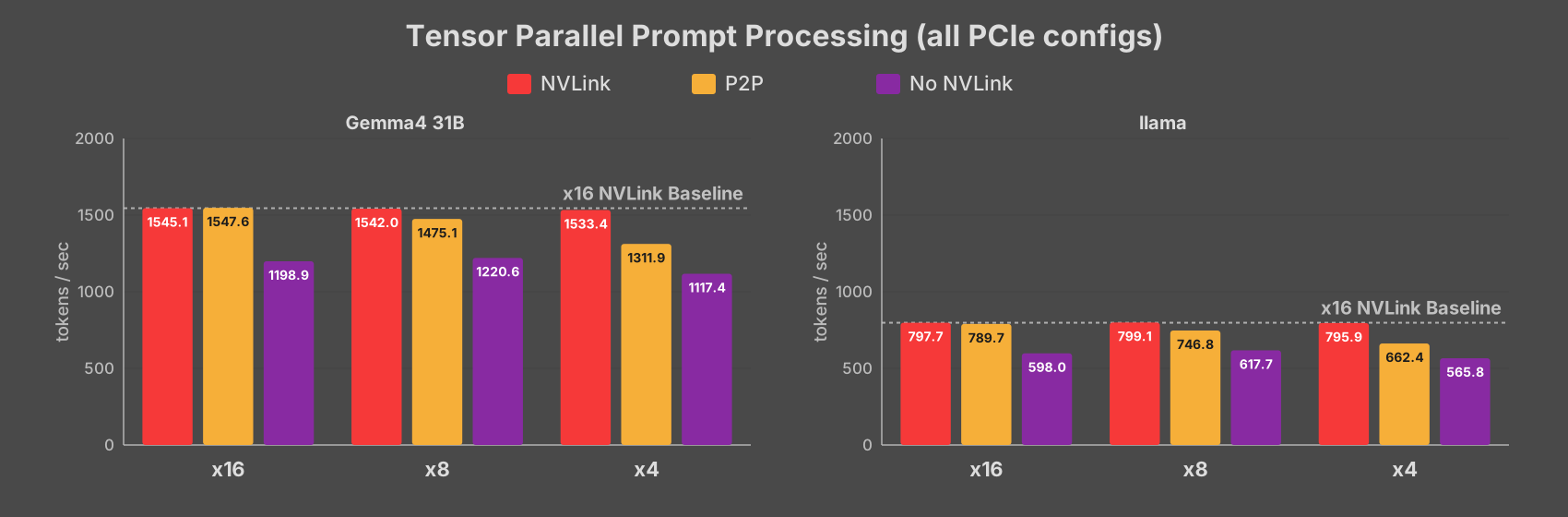
For tensor parallel inference, P2P sees a ~5% and ~15% drop at x8 and x4, respectively. The NVLink-based runs perform the same in all configurations and the SHM tests are much slower than both of the others.
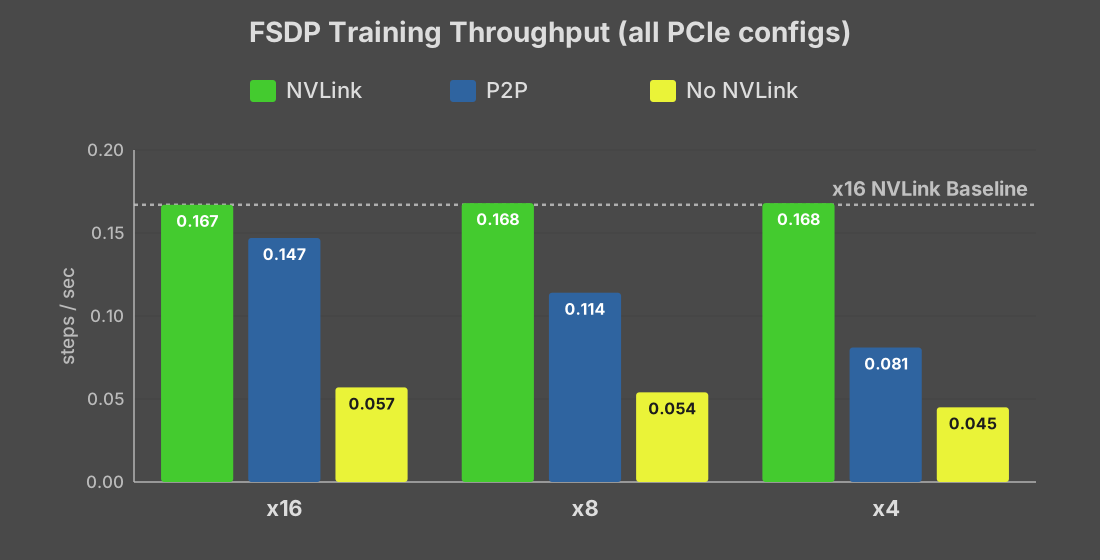
Reducing PCIe lanes has a much more dramatic effect on FSDP training. Even the P2P driver patch starts to lose efficacy as it becomes restricted by PCIe bandwidth. With the P2P driver, if you were running on x8/x8, NVLink is about 50% faster and it doubles the training speed if the GPUs are on x4 bandwidth.
SHM Bottleneck
One interesting observation is that the SHM results don’t degrade as sharply as the P2P results. The x8 and x16 results were identical in all tests, with only a ~5% penalty at x4 in both prompt processing and training. This would indicate that the bottleneck for SHM is not PCIe lanes, but something else on the path to main memory.
Measuring GPU ↔︎ GPU Bandwidth Directly
To confirm each configuration while I was testing, I ran p2pBandwidthLatencyTest.
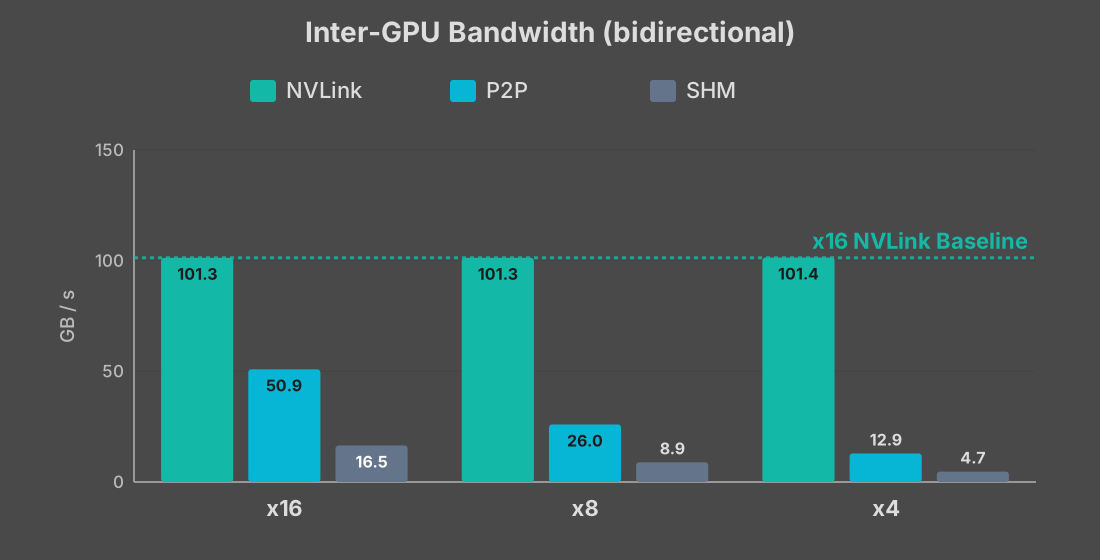
The reason for the results we saw is illustrated clearly here. NVLink provides the same 100GB/s bandwidth regardless of the underlying PCIe configuration. P2P over PCIe scales linearly with PCIe lanes, and SHM seems to bottleneck well below the available PCIe bandwidth.
Conclusion
NVLink is worth it in certain cases for people running dual GPUs at home. My setup, coincidentally, is one of the narrow exceptions where it isn’t.
NVLink makes sense if all of these are true
- You’re not running Linux OR not willing to apply the third-party P2P driver patch (I couldn’t find a Windows equivalent)
- You’re on a consumer platform where multiple GPUs drop PCIe to x8/x8 or lower
- Your workload is FSDP training or, to a lesser degree, tensor-parallel prompt processing
Bandwidth between GPUs doesn’t affect all workloads evenly. FSDP training saw the largest gains in my tests, especially at lower PCIe lane widths, while tensor-parallel prompt processing saw moderate improvements.
It’s worth noting that my initial result with P2P disabled at the driver level is the experience most buyers would have out of the box. The patch is unofficial and Linux-only, so if you can’t or won’t apply it, an NVLink bridge becomes the only way to get the full benefit of multiple GPUs.
NVLink bridges are not cheap. Do the math: instead of buying an NVLink bridge, you may be able to buy into a workstation (like Threadripper) or server (like Epyc/Xeon) platform that gives you full x16 lanes natively.